YOUR NEXT HELLO STARTS HERE
Welcome back.
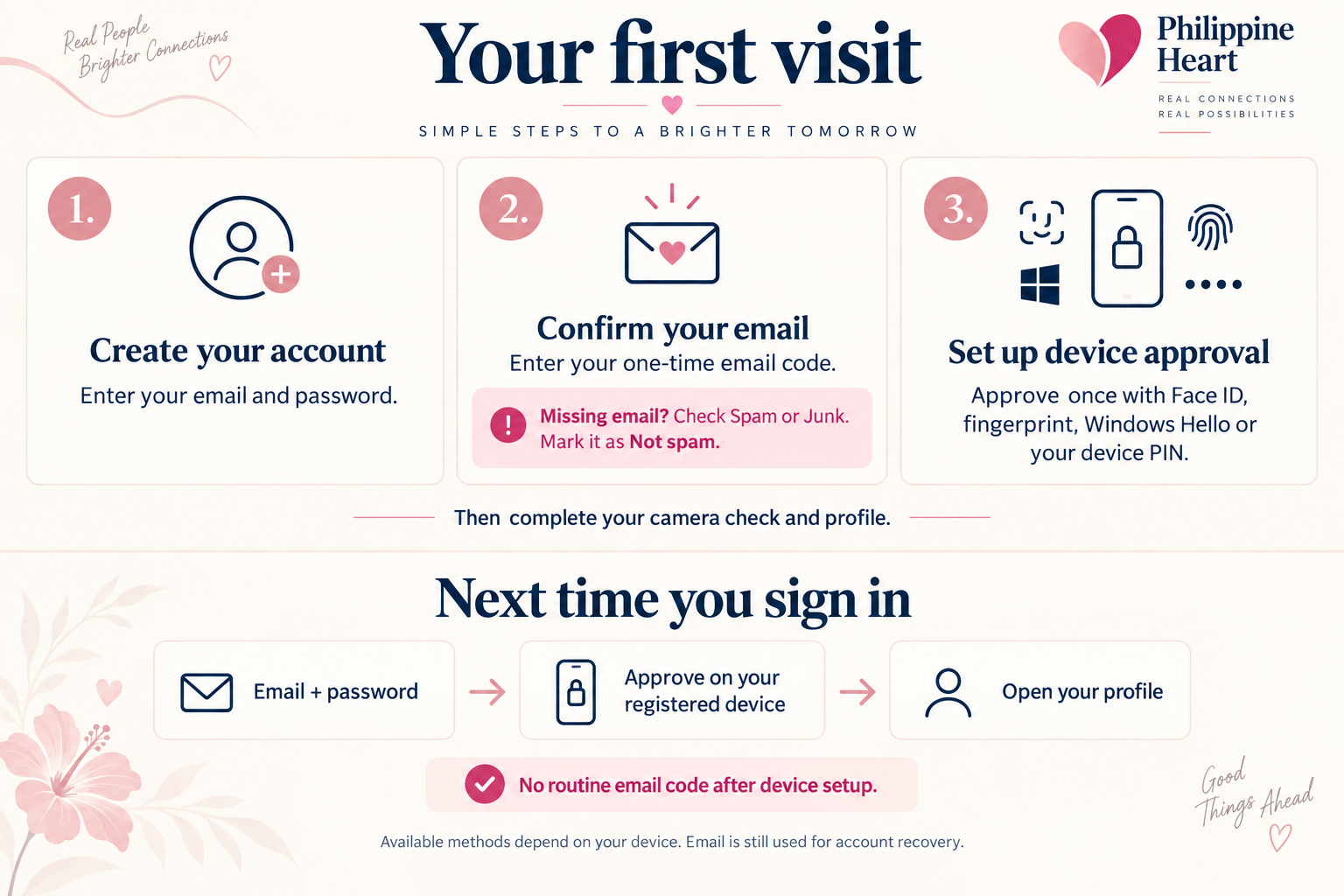
Enter the email address and password you used when you joined. Already approved? You normally do not need to record another video.
Already set up this phone or computer? Use its Face ID, fingerprint or screen lock without typing your email and password. Your device chooses the available method.
What happens next?
- Sign in with your email and password.
- Confirm it is you if asked: use the code in your email or the screen lock on your device.
- New or unfinished profile? We take you to the camera check. An approved profile normally opens your account directly.
Approve on your device
Use Face ID, Windows Hello, a fingerprint or your device PIN. Your device decides which methods are available.
Connecting secure sign-in…
Forgot your password?Keep your conversations on Philippine Heart. Never share your password or email codes.
See the sign-in guide
Having trouble signing in?
No email code? Check Spam or Junk for an email from heart@philippinehearte.com. Use the newest six-digit code. Keep this page open while you check your email.
Forgot your password? Use “Forgot your password?” above. Creating another account is not necessary.
Device approval? This means Face ID, fingerprint or your phone/computer screen lock. It is separate from the profile video check.
Still stuck? Email us for help. Tell us which step stopped and the message you saw. Never send your password or email code.